Material You widget pack for KWGT requiring KWGT Pro Key
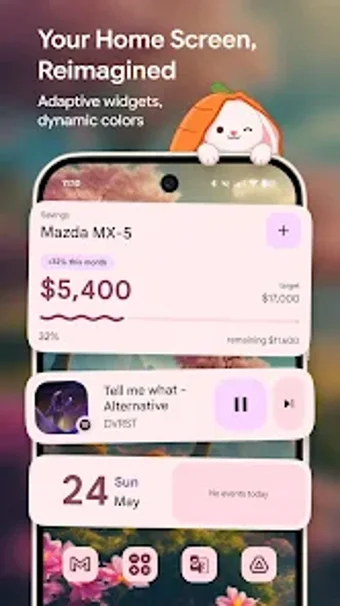
n0widgets: Material You Widget, by n0white, brings Material You styling to Android home screens as a widget pack for customization. It provides themed widgets that pull palette colors from the wallpaper and apply them to clocks, weather, battery meters, and media controls to match the desktop backdrop. Widgets use vector artwork for crisp scaling across resolutions, include multiple widget types, and offer adjustable appearance controls. The pack targets Android enthusiasts and power users seeking a system-like, wallpaper-driven look.
How does it apply Material You colours to home-screen widgets?
n0widgets uses the Material You color-extraction approach to sample wallpaper palettes and apply them to widget elements, a behavior the pack exposes through its templates. The pack supports dynamic theming even on older Android releases where native theming is limited, so the color adaptation works beyond the latest system builds. Because the templates rely on the Material color engine, widgets update their appearance when the wallpaper changes.
How much control do you get over appearance and scaling?
The pack's designs are vector-based, so icons and type remain sharp when you resize widgets inside the Kustom editor. You can change scale and layout because elements adapt to widget dimensions, and the pack exposes global appearance controls for consistent tweaks. Typical adjustable parameters include size, color follow, and spacing, which you set inside the Kustom editing environment to match your layout.
Does using these widgets affect battery life or system responsiveness?
As a skin collection rendered by the Kustom engine, n0widgets does not add a separate background service; rendering is handled by the host widget engine. The developer notes the pack is optimized for the Kustom platform and designed with low battery impact in mind, so battery load is comparable to other Kustom-based widgets rather than standalone animated wallpapers.
Is installation and daily use approachable for nontechnical users?
Installation requires the Kustom Widget Maker and the KWGT Pro Key to apply templates. To use a widget you add a KWGT placeholder to the home screen, tap it to open the editor, and select n0widgets from the installed packs list. Widgets do not appear as standalone entries in the system picker, and the developer issues regular updates that add designs and fixes.
Who benefits from installing this widget pack?
n0widgets suits Android users who already work with Kustom tools and want wallpaper-driven, system-like widgets across devices. It rewards users who accept an editing workflow rather than seeking immediate, plug-and-play widgets. For those comfortable with KWGT editing, the pack delivers consistent theming and precise scaling; casual users who avoid Kustom workflows may find the setup demands a learning step.
Pros
Wallpaper-extracted dynamic colors that mimic Material You
Vector-based artwork scales cleanly across resolutions
Large selection of clock, weather, battery, and media widgets
Optimized for Kustom (KWGT) with low battery impact
Cons
Requires KWGT and the KWGT Pro Key to apply widgets
Widgets do not appear as standalone entries in the system picker
Setup expects familiarity with Kustom editing workflows
Laws concerning the use of this software vary from country to country. We do not encourage or condone the use of this program if it is in violation of these laws. Softonic may receive a referral fee if you click or buy any of the products featured here.